
Self-hosted Supabase
for all your projects
Supavise is free and open source. It brings every Supabase organization and project your team runs into one dashboard you host yourself.
curl -fsSL https://supavise.dev/install | sudo bash -s -- \
--email you@example.com --firewall ufwUses a free <server-ip>.sslip.io address. Good for a trial.
curl -fsSL https://supavise.dev/install | sudo bash -s -- \
--domain example.com --email you@example.com --firewall ufw \
--dns cloudflare --dns-credentials-file /root/cloudflare.envSet up DNS first (step 1 below).
The hosted experience, on your server
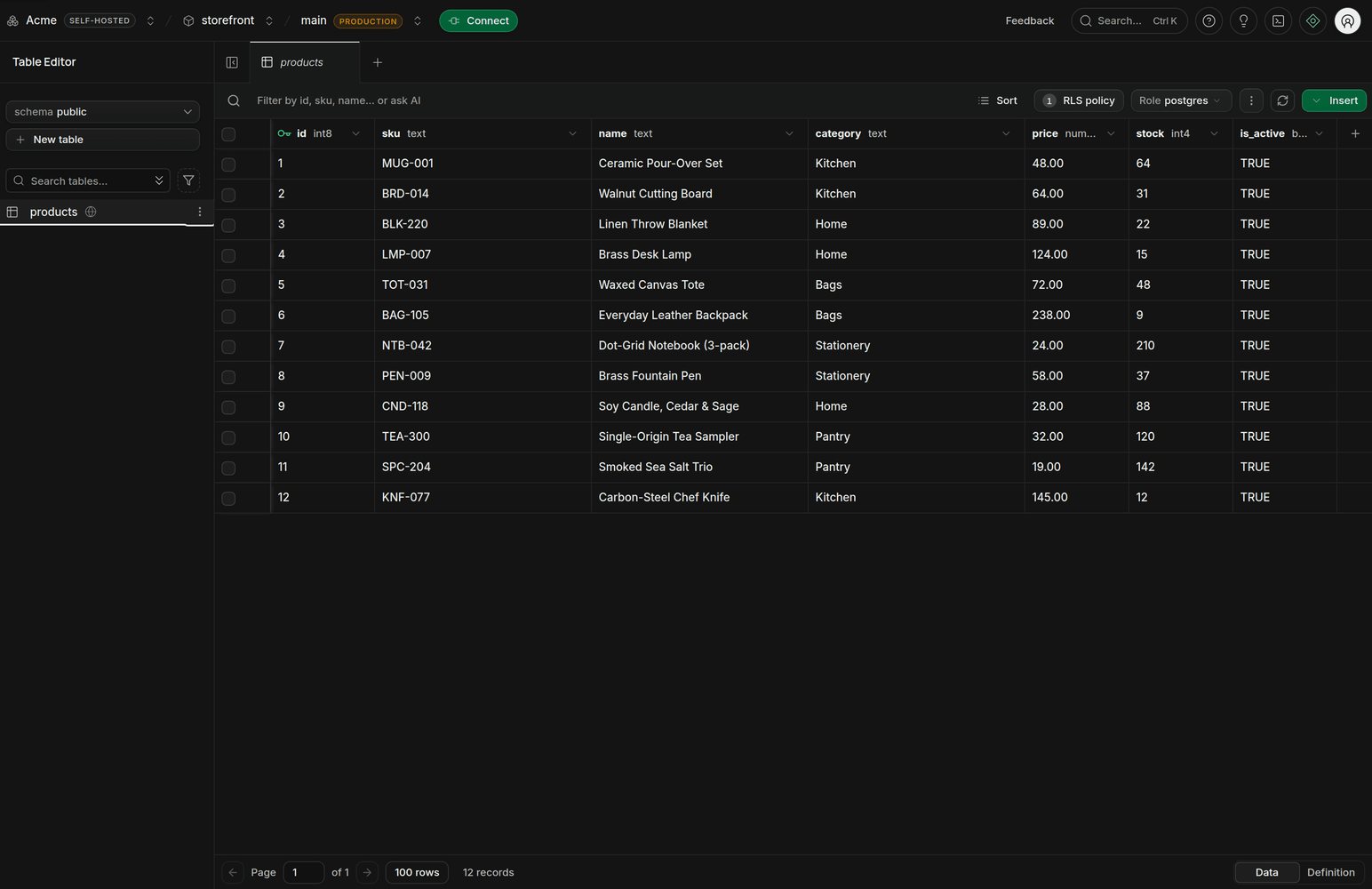
The Studio you know from supabase.com, with every organization and project in one place.
What's included
What self-hosted Supabase usually leaves out, in one install.
Supabase Studio
Supabase's open-source Studio in its hosted mode: organizations, projects, editors and settings that save.
Every project
Its own Postgres 17, Auth and REST, plus GraphQL, Realtime, Storage, Edge Functions and custom domains.
Compute sizes
Nano to 16XL per project, as on hosted Supabase, each held to its memory and CPU limits. Resize in Studio.
Branching
Schema-only branches or copies of your data, with merge, reset and expiry, for previews and agents.
Backups
Continuous WAL archiving, nightly backups that include Storage files, and point-in-time restore in Studio.
Teams
Organizations, Owner to Read-only roles enforced by the API, invitations, SAML single sign-on and MFA.
API keys
Publishable and secret keys you create and revoke, legacy JWT keys you can switch off, and key rotation.
Monitoring
One status command for the node and every project, a health endpoint, and alerts by email or webhook.
Operations
Automatic HTTPS, OS security updates with reboots held to your window, and signed updates that roll back.
AWS
A CloudFormation template that asks only for your email, then creates the instance, volume and bucket.
Up and running in three steps
Point DNS at the server
- Four records:
api,studio,poolerand*.api. - No domain? Skip this step.
api.example.com A 203.0.113.10 studio.example.com A 203.0.113.10 pooler.example.com A 203.0.113.10 *.api.example.com A 203.0.113.10- Four records:
Run the installer
- Verifies the release signature first.
- Prints your dashboard URL and a claim token.
Supavise is running. Dashboard https://studio.example.com API https://api.example.com Pooler pooler.example.com (ports 5432 and 6543) Create the first administrator at https://api.example.com/claim with this token (works once, expires in 72h0m0s): sbc_••••••••••••••••••••••••••••••••Claim your node
- Paste the token on the claim page.
- Sign in to Studio and create projects.
Or deploy on AWS
One CloudFormation stack: an instance, a data volume and S3 backups, in about ten minutes.
From the AWS console
- Download
supavise.yamlfrom the latest release. - In CloudFormation, create a stack from it and enter your admin email.
- When it reaches
CREATE_COMPLETE, open the Outputs tab.
curl -fsSLO \
https://github.com/supavise/supavise/releases/latest/download/supavise-aws-deploy.sh
chmod +x supavise-aws-deploy.sh
./supavise-aws-deploy.sh --region us-east-1 --email you@example.comNeeds the AWS CLI v2. Add --domain and --hosted-zone-id to use your own domain in Route 53.
Native Supabase, no Docker
Each project runs its own Postgres, Auth and REST, and shares the rest.
Your serverUbuntu 24.04+ or Debian 12+, amd64 or arm64
SupaviseManagement APIHTTPS routingLifecycleBackups
Supavise runs Organization 1 (Project 1, Project 2, Project 3) and Organization 2 (Project 4). Each project runs its own Postgres, Auth, REST. Pooler (Supavisor), Realtime, Storage, Edge Functions, Studio, postgres-meta run once and serve every project. Every one is a systemd unit.
systemd3 services per project, 6 shared. No Docker.
About 20 projects with room for traffic on an 8 GB server
About 150 MB per idle project, plus 1.5 GB per node.
| Idle projects | Memory | Per project, own |
|---|---|---|
| 10 | 1,548 MB | 70.3 MB |
| 25 | 3,784 MB | 66.5 MB |
| 50 | 7,451 MB | 65.2 MB |
Works with your tools
Point the Supabase CLI, the MCP server and supabase-js at your node. Agents get their own branch.
# on the server: print the profile, then copy supavise-profile.yaml to your machine
sudo -u supavise supavise api profile --format yaml > supavise-profile.yaml
# on your machine, with an access token from Account settings
supabase --profile ./supavise-profile.yaml login --token sbp_...
supabase --profile ./supavise-profile.yaml link --project-ref <ref>
supabase --profile ./supavise-profile.yaml db push# a full project with a copy of the parent's data; it deletes itself after 7 days
supabase --profile ./supavise-profile.yaml branches create agent-task-42 \
--project-ref <ref> --with-data
supabase --profile ./supavise-profile.yaml branches get agent-task-42 --project-ref <ref>{
"mcpServers": {
"supabase": {
"command": "npx",
"args": ["-y", "@supabase/mcp-server-supabase@latest", "--api-url", "https://api.example.com"],
"env": { "SUPABASE_ACCESS_TOKEN": "sbp_..." }
}
}
}import { createClient } from '@supabase/supabase-js'
// the URL is the only part that differs from supabase.com
const supabase = createClient('https://<ref>.api.example.com', '<publishable key>')# one pooler for every project: Supavisor routes on the user name
psql "postgres://postgres.<ref>:<password>@pooler.example.com:6543/postgres"Everyday operations
One command each, run on the server. Releases are signed, and every change to main is tested on real Ubuntu servers.
Invite your team
Prints a one-time invite link.
Restore to a point in time
In place, or as a new project.
Check health
One verdict for the node and every project.
Update
Signed. Backs up every project first and rolls back if it fails.
Check for updates
By default it checks daily and installs nothing.
Set a maintenance window
OS security reboots wait for it.
Current release
Supavise is alpha software. Expect bugs and rough edges, and report what you find on GitHub.
- Postgres
- 17.11.0.004
- Auth
- 2.195.0
- PostgREST
- 16.4
- Realtime
- 2.140.10
- Storage
- 1.79.36
- Supavisor
- 2.9.13
- Edge Runtime
- 1.77.4
- postgres-meta
- 0.100.0
- Studio
- 2026.10.05
Tested against Supabase CLI 2.120.0 on every push. versions.yaml
Provided as is
Offered under Apache-2.0 with no warranty. Try it before trusting it with production data, and keep your own backups.
Security
Not independently audited. Projects on one server share a trust domain, so only host projects that can trust each other. Report vulnerabilities privately.
Privacy
Your data stays on your server and in the backup storage you choose. Studio's third-party analytics are off. Supavise checks GitHub for releases and talks to the services you configure, like your certificate authority and DNS provider.
Open source and early
Free under Apache-2.0 and built in the open, like Supabase. Come build with us: ideas, issues and pull requests are all welcome.